

Tutorial Lengkap CRUD Codeigniter 4 dan React js #4 Edit Data
Edit data selalu dibutuhkan dalam sebuah sistem programing. Kali ini kita akan lanjutkan tutorial CRUD codeigniter 4 dengan react js bagian edit data.
Setelah sebelumnya dalam Tutorial Lengkap CRUD Codeigniter 4 dan React js #3 Show Data kita sudah membuat tombol untuk delete dan edit tapi belum berfungsi sebagaimana mestinya. Sekarang mari kita buat tommbol edit ini berfungsi. Langsung saja ya!.
Membuat REST API Codeigniter 4 edit dan update data
Untuk mengedit sebuah data kita membutuhkan 2 request yang pertama request untuk mengambil data yang mau kita edit yang kedua request untuk mengupdate data yang sudah kita edit. Baik langsung saja kita buat. Buka file app/Controllers/Quotes.php### Method baru di controller quotes
Method untuk mengambil data yang mau diedit
public function edit($id = NULL)
   {
       $get = $this->model->getQuotes($id);
       if ($get) {
           $code = 200;
           $response = [
               'status' => $code,
               'error' => false,
               'data' => $get,
           ];
       } else {
           $code = 401;
           $msg = ['message' => 'Not Found'];
           $response = [
               'status' => $code,
               'error' => true,
               'data' => $msg,
           ];
       }
       return $this->respond($response, $code);
   }
Method untuk mengupdate data yang sudah diedit
public function update($id = NULL)
   {
       $data = $this->request->getRawInput();
       $simpan = $this->model->updateQuotes($data, $id);
       if ($simpan) {
           $msg = ['message' => 'Updated Quotes successfully'];
           $response = [
               'status' => 200,
               'error' => false,
               'data' => $msg,
           ];
           return $this->respond($response, 200);
       }
   }
Penjelasan! Codeigniter 4 mempunyai magic untuk mengupdate data yaitu fungsi getRawInput() ini untuk mengambil request data baru dari user dan juga untuk membuat array yang nantinya akan diteruskan ke models.
Menambah method pada models quotes
Buka file di app/Models/Quotes_model.php tambah 2 method ini
public function getQuotes($id = false)
{
    if ($id === false) {
        return $this->findAll();
    } else {
        return $this->getWhere(['quote_id' => $id])->getRowArray();
    }
}

public function updateQuotes($data, $id)
{
    return $this->db->table($this->table)->update($data, ['quote_id' => $id]);
}
Selesai kita membuat rest apinya dengan codeigniter 4 teman teman bisa coba dulu di postman dengan url . - Ambil data yang madu diedit
 http://localhost:8080/quotes/id/edit

 // * id
// ganti dengan id data yang mau di edit- Dan update data di
http://localhost:8080/quotes/id

//dengan method put atau patch
//dengan mengirim body quotes baru
Biar tidak bingung mari kita pasang di react js nya jangan lupa jalankan webpack —watch agar ketika kita mengedit project react js nya langsung connect dengan codeigniter 4.
Edit data react js rest api codeigniter 4
Membuat default state baru untuk edit
Buka file react/src/components/Home.js Tambahkan pada statenya seperti ini
constructor(props) {
    super(props);
    this.state = {
      listquotes: [],
      quotes: "",
      quote_id_edit: "",
      isEdit: false,
    };
    this.onChange = this.onChange.bind(this);
    this.handleSubmit = this.handleSubmit.bind(this);
}- quotes_id_edit merupakai state yang akan kita isi oleh id data yang mau kita edit
- isEdit Ini untuk keperluan ui jadi kita akan pakai sebuah form jika state ini true maka form tersebut terbuka dan tentunya untuk mengedit data.
Membuat tombol edit berfungsi
Ubah button editnya jadi
<a
 href="#"
 class="badge badge-warning"
 onClick={() => this.edit(data.quote_id)}
>
Disitu kita memberi event jika tombol di klik makan fungsi edit jalan sambil mengirim id data yang akan diedit. ### Tampilan dinamis form tambah data dengan edit data
Tetap di file yang sama ya karena memang tutorial untuk react js nya cuma fokus satu file aja. Kita akan mencoba membuat form tambah data juga bisa digunakan untuk edit data kodenya seperti ini
{this.state.isEdit ? (

   <input
     class="btn btn-warning btn-sm"
     type="button"
     value="Edit Quotes"
     onClick={() => this.update()}
   />
   <input
     class="btn btn-danger btn-sm"
     type="button"
     value="Close"
     onClick={() => this.setState({ isEdit: false })}
   />

) : (
 <input
   class="btn btn-primary btn-sm"
   type="submit"
   value="Add Quotes"
 />
)}
Penjelasan Jadi tombol tambah data kita beri logic jika state isEdit true bukan tombol tambah data yang ditampilkan melainkan tombol edit data.
Fungsi request ke rest api untuk edit data react js
edit(id) {
   fetch("http://localhost:8080/quotes/" + id + "/edit", {
     method: "get",
   })
     .then((respon) => respon.json())
     .then((ra) => {
       this.setState({
         quotes: ra.data.quote,
         quote_id_edit: id,
         isEdit: true,
       });
     })
     .catch((err) => {
       console.log(err);
     });
 }

 update() {
   fetch("http://localhost:8080/quotes/" + this.state.quote_id_edit, {
     method: "put",
     headers: {
       Accept: "application/json",
       "Content-Type": "application/x-www-form-urlencoded",
     },
     body: `quote=${this.state.quotes}`,
   })
     .then((respon) => respon.json())
     .then((ra) => {
       this.componentDidMount();
     });
 }
Jadi untuk kode lengkapnya sampai edit pada react js home.js seperti ini
import React, { Component } from "react";
import Shimmer from "react-js-loading-shimmer";

export default class Home extends Component {
  constructor(props) {
    super(props);
    this.state = {
      listquotes: [],
      quotes: "",
      quote_id_edit: "",
      isEdit: false,
    };
    this.onChange = this.onChange.bind(this);
    this.handleSubmit = this.handleSubmit.bind(this);
  }

  onChange(event) {
    this.setState({ quotes: event.target.value });
    console.log(this.state.quotes);
  }

  handleSubmit(event) {
    fetch("http://localhost:8080/quotes/create", {
      method: "post",
      headers: {
        Accept: "application/json",
        "Content-Type": "application/x-www-form-urlencoded",
      },
      body: `quote=${this.state.quotes}`,
    })
      .then((respon) => respon.json())
      .then((ra) => {
        this.componentDidMount();
      });

    event.preventDefault();
  }

  componentDidMount() {
    fetch("http://localhost:8080/quotes")
      .then((respon) => respon.json())
      .then((ra) =>
        this.setState({
          listquotes: ra,
        })
      );
  }

  edit(id) {
    fetch("http://localhost:8080/quotes/" + id + "/edit", {
      method: "get",
    })
      .then((respon) => respon.json())
      .then((ra) => {
        this.setState({
          quotes: ra.data.quote,
          quote_id_edit: id,
          isEdit: true,
        });
      })
      .catch((err) => {
        console.log(err);
      });
  }

  update() {
    fetch("http://localhost:8080/quotes/" + this.state.quote_id_edit, {
      method: "put",
      headers: {
        Accept: "application/json",
        "Content-Type": "application/x-www-form-urlencoded",
      },
      body: `quote=${this.state.quotes}`,
    })
      .then((respon) => respon.json())
      .then((ra) => {
        this.componentDidMount();
      });
  }

  render() {
    return (
    <form onSubmit={this.handleSubmit}>
      <label>
        <input
          type="text"
          name="name"
          class="form-controll"
          value={this.state.quotes}
          onChange={this.onChange}
        />
      </label>
      {this.state.isEdit ? (

          <input
            class="btn btn-warning btn-sm"
            type="button"
            value="Edit Quotes"
            onClick={() => this.update()}
          />
          <input
            class="btn btn-danger btn-sm"
            type="button"
            value="Close"
            onClick={() => this.setState({ isEdit: false })}
          />

      ) : (
        <input
          class="btn btn-primary btn-sm"
          type="submit"
          value="Add Quotes"
        />
      )}
    </form>

  <table class="table table-hover">
    <thead>
      <tr>
        <th scope="col">Quotes</th>
        <th scope="col">Action</th>
      </tr>
    </thead>
    <tbody>
      {this.state.listquotes.map((data) => {
        return (
          <tr>
            <td>{data.quote || <Shimmer height={"50px"} />}</td>
            <td class="d-flex justify-content-around">
              <a
                href="#"
                class="badge badge-danger"
              >
                delete
              </a>
              <a
                href="#"
                class="badge badge-warning"
                onClick={() => this.edit(data.quote_id)}
              >
                edit
              </a>
            </td>
          </tr>
        );
      })}
    </tbody>
  </table>
    );
  }
}
Hasilnya seperti ini 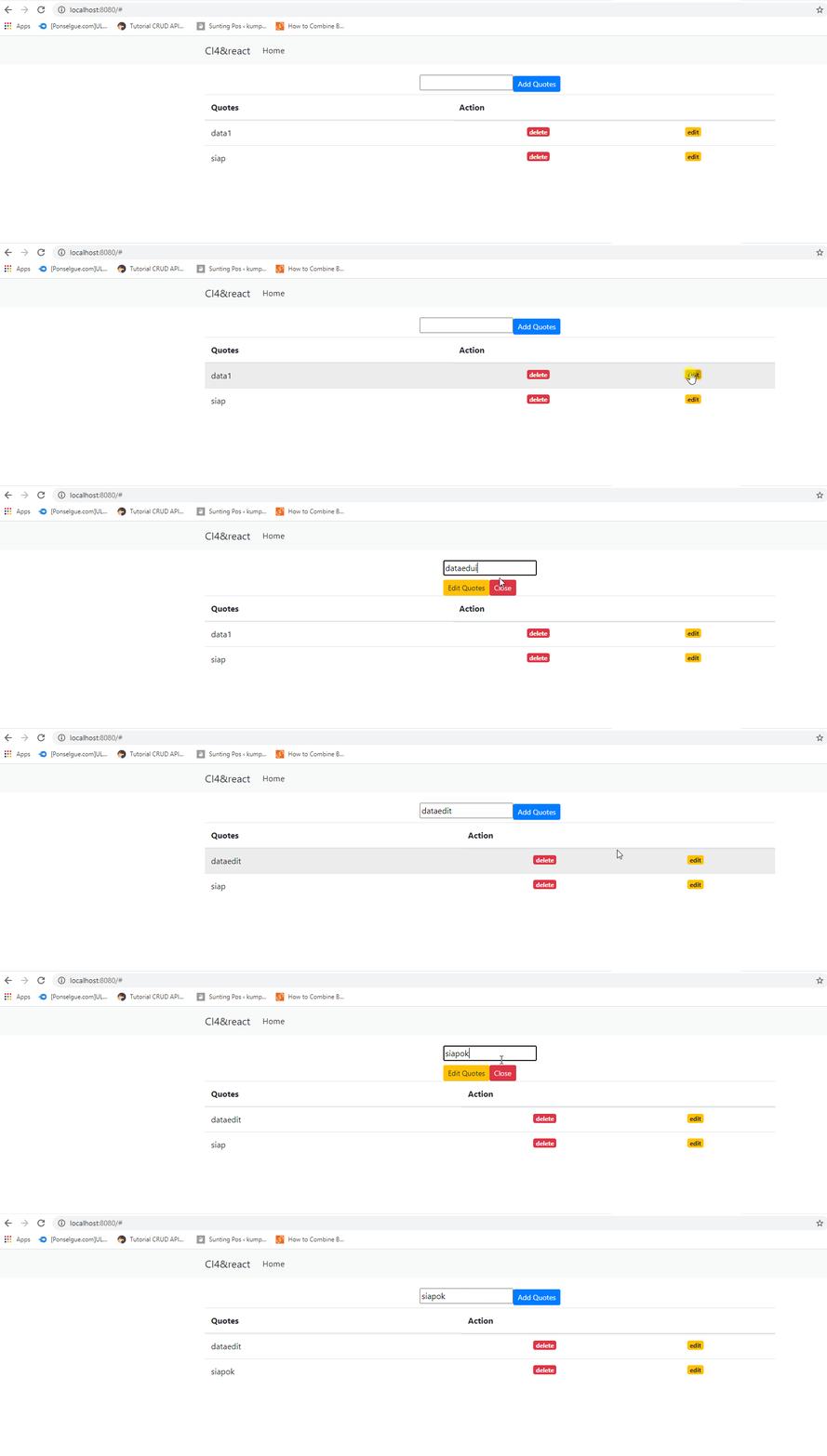
About the Author
Catatan ringan seorang programmer otodidak.
Comments